winding machine application - Energy Storage
Energy Storage
Winding Machines for the Aerospace and Defense Industry
Aerospace Industry
Car assembly on production line at Winding Machines for the Automotive Industry
Automotive Industry
winding machine application - Electrical and Electronics
Electrical and Electronics
Winding Machine for Communication Equipment
Communication Equipment
winding machine application - Consumer Electronics
Consumer Electronics
Winding Machines for Household Appliances
Household Appliances
winding machine application - Industrial Automation and Robotics
Industrial Automation
Winding Machine for the Lighting Industry
Lighting Industry
winding machine application - Renewable Energy Industry
Renewable Energy Industry
A man operating a wire making machine at GuangRi
Why Choose Us
A man operating a machine that produces a red wire This image showcases the Transformer Winding Machine and its technology
Winding Technology
A man in a suit holding a small coil symbolizing Development Engineering for Different Industries
Development & Engineering
Partner Development Programs A business environment where a diverse group is observing a handshake between two people implying a successful agreement or partnership
Partner Support
A company team building event on the beach showing a group of people posing for a photo
GuangRi Gallery

Toroidal Taping Machine: Fast Operation & Setup

Learn safe startup, parameter setup, auto/pedal modes, taping math, and maintenance to run Guangri toroidal tapers with speed and repeatability.

Table of Contents

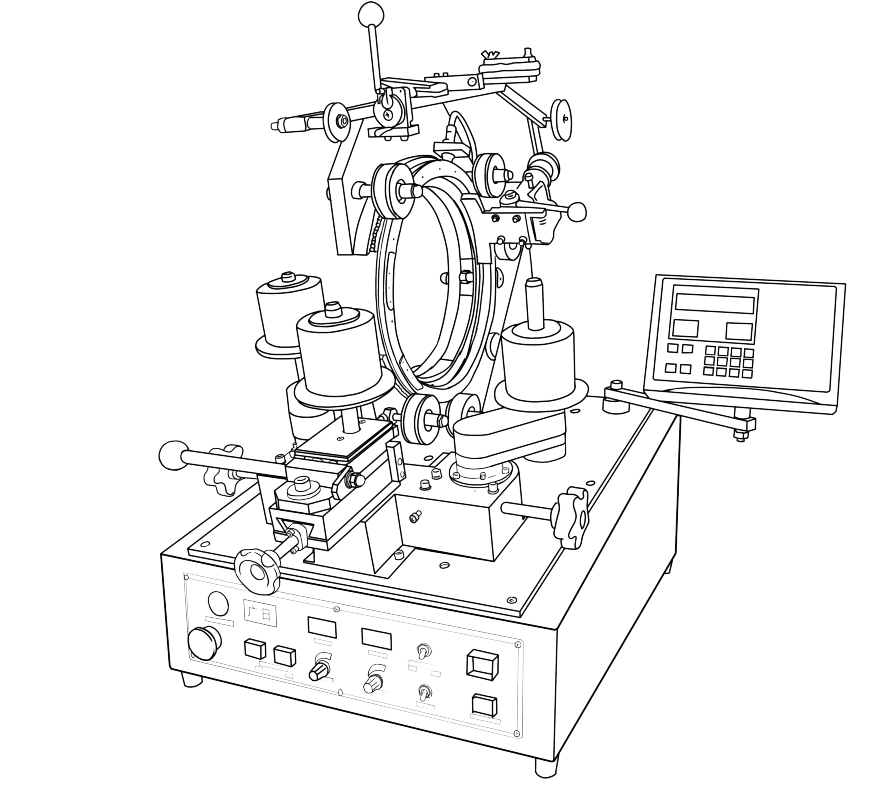
A toroidal taping/winding machine builds and finishes ring-shaped coils. It loads wire or insulating tape into a shuttle (or magazine), rotates the toroidal core, and lays each turn with controlled pitch, speed, and tension. You’ll see these machines in transformer shops, EV power assemblies, audio power supplies, medical devices, and any place where low-leakage, low-noise toroidal parts are made.
When fitted with a taping head, the same platform wraps paper/polyester/kapton tapes around the core for insulation and reinforcement—clean, even, and repeatable.

Toroidal taping machine with winding control panel

This guide focuses on Guangri’s PLC-controlled models (e.g., JGC-series). They pair a rugged base with a smart controller so operators can store recipes, run in pedal or auto modes, and keep production consistent across shifts.

Safety & Power-On

Before starting any winding or taping cycle, safety is first. Always place the machine in a well-ventilated area (13–35°C, no corrosive fumes, low vibration). Make sure the machine is properly grounded and that the power supply is fitted with the correct circuit breaker rating. This prevents electrical hazards and protects both the operator and the equipment.

To power on:

  1. Release the Emergency Stop (E-stop).

  2. Flip the power switch on the base.

  3. The controller will boot into Waiting state. You’ll know it’s ready because the “Ready/Waiting” indicator lights up. If it’s off, the machine is in Setting state, meaning you can still adjust parameters before running.

Pro tip: Always double-check grounding and E-stop reset before loading a core. It prevents unnecessary errors and keeps the start-up smooth.

Front Panel & Controls (Quick Tour)

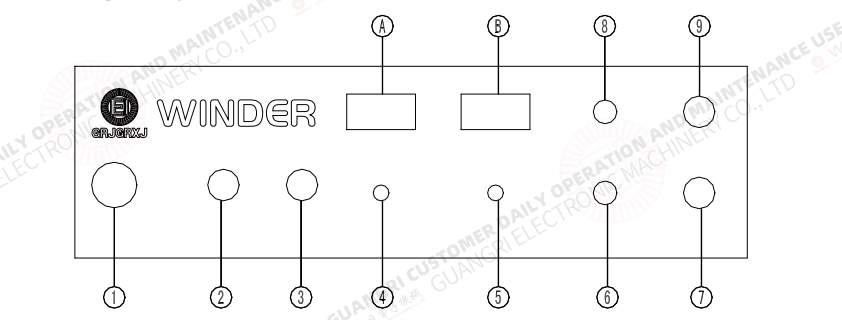
Front panel controls and indicators of Guangri winder

The Guangri controller’s front panel is your main command center. It includes:

  • Nine function keys for power, start/stop, reset, manual jog, direction control, and auto/manual mode selection.

  • Two knobs: one for speed (winding/taping RPM), one for pitch (spacing between turns or tape wraps).

  • Direction switch: sets CW/CCW rotation.

  • Mode switch: toggle between Manual mode (slow jogs, setup adjustments) and Auto mode (continuous winding/taping).

Operation flow:

  • Start/Stop key: arms the machine and begins the cycle.

  • Reset key: clears a fault or prepares for the next job.

  • Manual mode: ideal for setup, coil positioning, or trial runs.

  • Auto mode: hands-free, repeatable runs with stored programs.

You can run jobs via the foot pedal (pedal mode) or go fully automated with Auto-start (machine ramps up and down automatically).

Back Panels & Switches

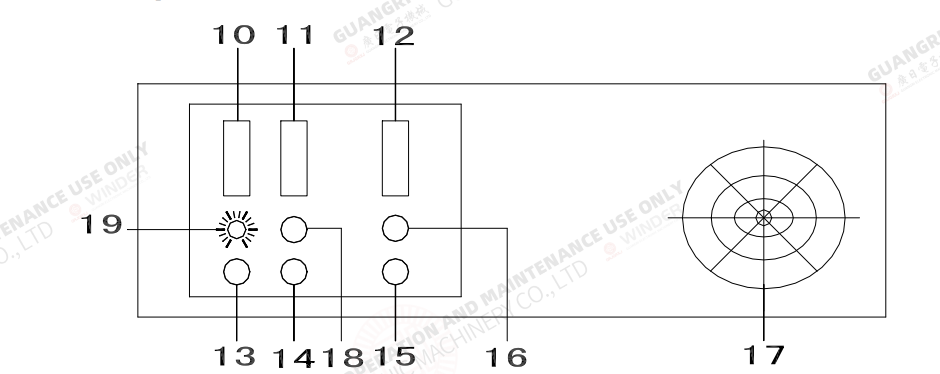
Back panel sockets and switches of winding machine

The base and counter rear panels hold the connections and deeper configuration:

  • Base sockets: plug-ins for the controller, pedal, sensors, and—on taping machines—the auto-scissors. Also includes fuse access and main power input.

  • Mode selector switch: choose Pedal (pedal governs speed/stop) or Auto-start (controller accelerates/decelerates automatically).

  • Grounding terminal: always secure before operation.

On the counter/controller rear, you’ll find machine-type and function switches:

  • Machine type switch: set for toroidal, belt/slider, gear head, or taping models.

  • Rotation switch: single vs double direction (depending on whether reversals are needed).

  • Transducer switch: selects the correct sensor type (e.g., JG = 7PA, JGC = 7NA). Wrong selection means the counter won’t work.

  • Core start direction switch: for fan-shape windings under auto mode.

Pro tip: These rear-panel switches must be set before first power-up, or the machine will not recognize the correct configuration.

Programming the Controller

Programming the Controller interface with display keys

At the heart of Guangri’s toroidal taping and winding machines is the controller panel, where operators set up and manage every job. The panel uses four key display windows:

  • Specification window – stores job numbers and lets you recall or save coil specs.

  • Program window – defines the sequence of steps (e.g., Load then Wind). Each job needs at least two steps, with options to add taps.

  • Times window – sets how many times a step repeats. This avoids re-programming when multiple windings share the same turn counts.

  • Turns window – sets exact turns for loading, winding, slowdown, and even reversal for fan-shape windings.

The machine operates in three modes of control flow:

  • Setting state – when parameters are being entered.

  • Ready state – when the program is confirmed and waiting to run.

  • Review state – allows you to check stored parameters before pressing Start.

Keys like Setting, Enter, Return, and Review guide the operator through input and confirmation, making the workflow consistent and reliable.

Auto vs. Pedal Operation

The Guangri machine gives you flexibility between pedal control and Auto-Start.

  • Pedal mode: The operator governs speed and stop/start with the foot pedal—ideal for setup and manual control.

  • Auto-Start mode: Set on the base’s rear switch, this lets the machine ramp up to preset speed and ramp down smoothly at the end, without pedal input.

A standout feature is the proportional linking of the main drive and rotation drive. This ensures the wire pitch remains accurate no matter what winding speed you choose, giving consistent spacing and tighter control across different coils.

Loading & Winding by Head Type

Different winding heads require slightly different handling. Guangri machines support several head designs:

  • Slider head – Load the core, then adjust the friction spring and pressure pad for the right wire tension. The slider should move smoothly without blocking the wire.

  • Belt head – Secure the wire end, then use the belt tension screw to fine-tune grip. Stabilize the free wire end under the core before winding.

  • Gear head – Adjust the brake for correct tension before loading. Position the magazine and slider correctly, ensuring the wire passes through the guide groove without slippage.

  • Taping head – Route tape through the pressure clip and electric scissors before feeding it into the magazine. Once started, the machine automatically tapers the tape and uses the scissors to cut when complete.

Each head type has its quirks, but all share one goal: stable tension and precise winding or taping.

Taping Math & Example Setup

To get accurate and repeatable results, it’s important to understand the math behind taping. The key formulas are simple:

  • Tape-turns = core circumference ÷ (tape width – overlap)

  • Load-turns = tape-turns × (one-turn length ÷ magazine circumference)

These calculations make sure that every layer of tape overlaps correctly, delivering the right insulation thickness and coverage.

Example setup:

  1. Measure the core’s outer diameter to find circumference.

  2. Choose your tape width and set your desired overlap (e.g., 2 mm).

  3. Calculate tape-turns using the formula.

  4. Input load-turns into the controller program.

  5. Run a dry cycle to verify before committing to production.

By following this method, you cut down on trial-and-error and protect material quality.

Initial Switch Settings (Must-Do)

Before powering up for the first time, the machine’s rear and front panel switches must be set correctly. Skipping this step can cause errors or miscounts.

  • Mode: Auto or Pedal (depending on workflow).

  • Machine type: Winder, taping, or specific head style.

  • Rotation: CW (clockwise) or CCW (counterclockwise).

  • Sensor type: 7PA vs 7NA, depending on the model (wrong setting = counter won’t register).

These base settings ensure the controller recognizes the correct hardware and keeps winding or taping aligned with your program.

Run Workflow

Every successful winding or taping job follows a structured process:

  1. Load setup: Open the shuttle or magazine. Insert the core securely.

  2. Roller adjustment: Set polyurethane rollers for proper grip.

  3. Threading: Pass wire or tape through guides, pads, and tensioners.

  4. Start process: Press Start. In Auto mode, the machine ramps to preset speed. In Pedal mode, control is manual.

  5. Monitor: Adjust speed and pitch knobs during operation to fine-tune spacing.

  6. Record values: Note down pitch and speed settings for faster future setups.

This workflow keeps quality consistent and avoids costly scrap when switching between products.

Preventive Maintenance

Keeping your toroidal taping or winding machine in top shape doesn’t take much—it just requires regular checks. Start with the basics: grease and clean all rotating components and gears at set intervals. This keeps the motion smooth and prevents wear.

Next, always verify ventilation paths and cooling fans. Dust and debris can block airflow, causing heat buildup that shortens component life. Also, check that the machine is properly grounded and that breakers are sized and working correctly—this is a must for operator safety and stable performance.

A few minutes of maintenance today saves hours of downtime tomorrow.

Troubleshooting Quick Table

Here’s a simple guide operators can use when issues pop up:

  • No LEDs lighting up → Check power connection and main fuse.

  • Motor won’t start → Confirm foot pedal function and verify the knob isn’t set to zero.

  • Counter not registering → Adjust the transducer gap or confirm correct type (7PA vs 7NA).

  • Rotation motor idle → Inspect and adjust the drive belt.

Most problems trace back to basic power, sensor, or setup issues—solve these first before calling service.

Pro Tips

Want smoother runs and fewer surprises? Try these proven best practices:

  • Do a dry run: Mark the core and run without material to lock pitch settings before real winding.

  • Save job cards: Record pitch, speed, and program values under unique recipe names to speed up repeats.

  • Log key data: Track tape or wire usage, cycle time, and defect rates. This helps tune ramp times and optimize output.

  • Standardize setups: Create reference brake and pressure settings for common core sizes. This makes changeovers faster and more consistent.

By combining preventive care with smart logging, you’ll not only reduce downtime but also extend the life of your Guangri winding machines.

Ready to Take Your Coil Production Further?

At Guangri, we don’t just build machines—we build solutions tailored to your production needs. Whether you’re setting up your first toroidal taping line or upgrading for higher efficiency, our team is here to support you with training, customization, and after-sales service.

Get in touch with us today to request operation files, detailed manuals, or a personalized consultation. Let’s make your coil winding process smarter, faster, and more reliable.

Contact us now and experience why manufacturers worldwide trust Guangri for precision winding and taping machines.

FAQs

Q1: What makes a Guangri toroidal taping machine different from others?

A1: Guangri machines combine PLC control with auto/pedal modes, making setup faster and winding more consistent.

Q2: How do I know if my machine is ready to operate?

A2: Check the “Ready” light on the controller. If it’s on, parameters are confirmed and the machine will start when the pedal or auto mode is engaged.

Q3: Can I switch between manual and auto modes easily?

A3: Yes. Use the front-panel switch to select manual or auto operation. Auto-start ramps up gradually, while pedal mode gives you real-time control.

Q4: What should I do if the controller isn’t counting turns?

A4: This usually means the transducer type or gap isn’t set correctly. Recheck the sensor switch settings and adjust the distance.

Q5: How often should I maintain the machine?

A5: Regularly clean and grease moving parts, check fans and grounding, and inspect belts or brakes. Preventive care avoids downtime.

Q6: Do I need to program the controller for every new job?

A6: Yes, but you can save each coil’s recipe under a unique name. This makes changeovers much faster for repeat production.

Leave a Reply

Your email address will not be published. Required fields are marked *

Lasted Articles for You
en_USEnglish

Get in Touch for Technical Support

***We value your privacy and are committed to safeguarding your personal information with the utmost care.